Divert your calls to Lightspire
Keep the number your customers already know. Send its calls to your Lightspire number when you're busy, or all the time, and every call gets answered.
Watch it done

Read the transcript
0:00 Divert your calls to Lightspire
0:03 Diverting sends calls from the number your customers already know to your Lightspire number, so your agent answers when you can't. You keep your number.
0:11 Open Phone number. Your Lightspire number is at the top, marked Live. Underneath, Divert your existing number has the steps for Telstra, Optus and Vodafone, with your number already in every code.
0:23 Click your carrier and phone type. Most owners start with calls you don't answer: your phone rings first, and your agent picks up the rest. Choose every call when you're on a job or on holiday.
0:36 On the phone you're diverting, dial the code exactly as shown, with no spaces, and press call. You'll see or hear a confirmation. The code is dialled from that phone, not from the dashboard.
0:48 Now ring your business number from another phone. Calling your mobile from itself doesn't test it. Your agent answers, and the call appears on the Calls page with a recording and a transcript.
1:00 To stop diverting, dial the turn-off code from the same phone. On Optus and Vodafone, hash hash zero zero two hash turns everything off.
1:13 Next, connect your calendar so your agent only offers times you're free.
Before you start
- Your Lightspire number is live. If not, start with Get your Australian number.
- The mobile you want to divert is in your hand. You dial the code from that phone, not from the dashboard.
- A second phone to test with, or a mate who'll ring you.
- Diverting a landline or an office phone system? Use Divert a landline or office phone instead.
Four steps
Open your divert codes
In your dashboard, open Phone number. Your number is at the top under Your Lightspire number, marked Live. Underneath, Divert your existing number lists each carrier. Click your carrier and phone type, for example Telstra mobile. The codes it shows already have your Lightspire number in them, so you can dial them exactly as shown.
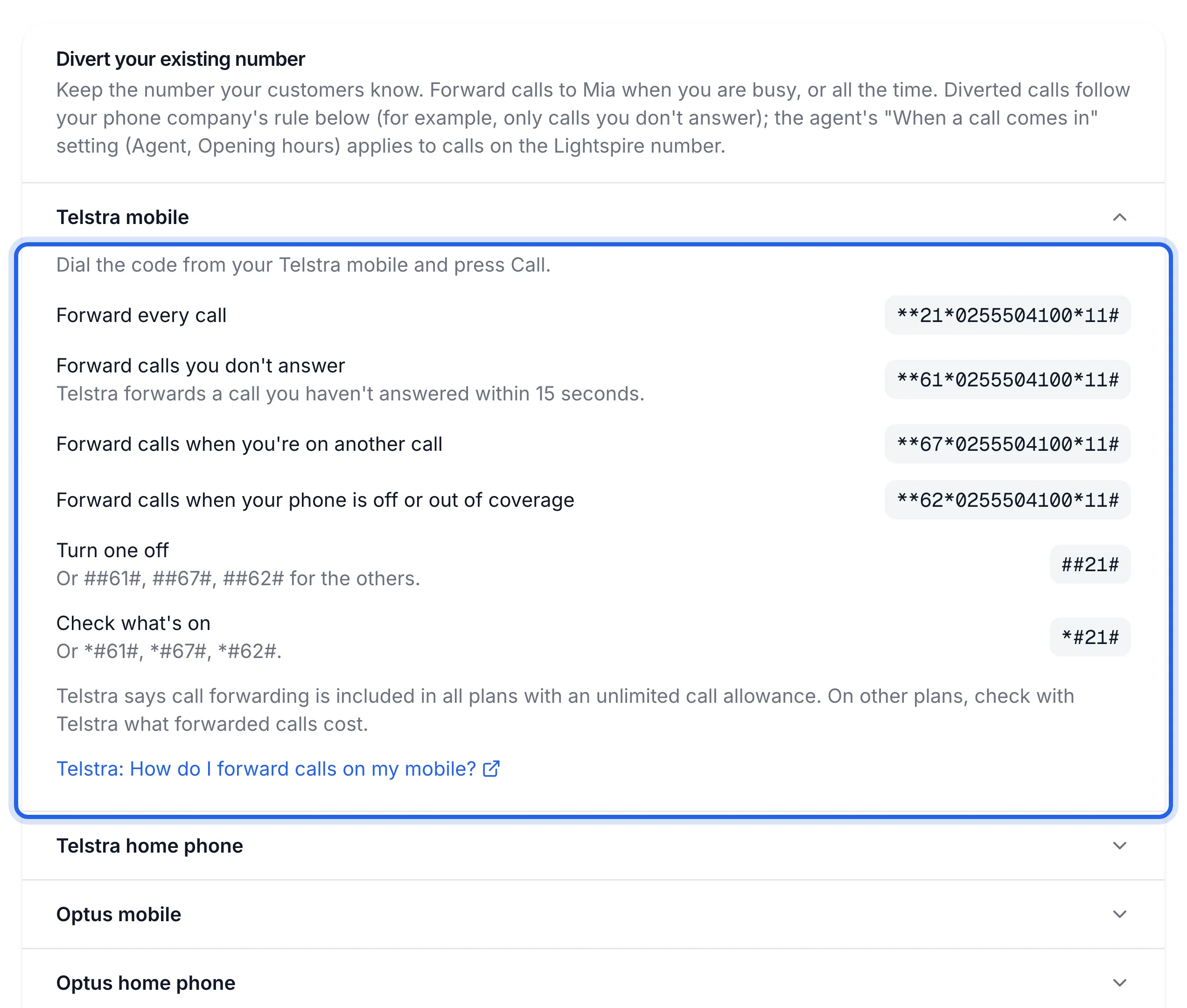
Choose when calls should divert
Most owners start with calls you don't answer: your phone rings first and your agent picks up the rest. Switch to every call when you're on a job, on holiday or after hours.
When Telstra mobile Optus mobile Vodafone mobile Every call **21*{number}*11#**21*{number}#**21*{number}#Calls you don't answer **61*{number}*11#**61*{number}*20#**61*{number}#You're on another call **67*{number}*11#**67*{number}#**67*{number}#Phone off or out of coverage **62*{number}*11#**62*{number}#**62*{number}#{number} is your Lightspire number with no spaces, starting with 0. The Phone number page fills it in for you.
Telstra diverts a call you haven't answered within 15 seconds. On Optus, the 20 in the code is how many seconds your phone rings first; Optus says it must be a multiple of 5.
Diverting only missed calls? Dial the "on another call" and "phone off" codes too, so those calls reach your agent as well.
Dial the code from the phone you're diverting
Open the keypad, type the code with no spaces, then press call. The example below uses a sample number; the Phone number page shows the one with yours.
**61*0355501234*11#Example for a Telstra mobile, diverting the calls you don't answer.You'll see or hear a confirmation. Vodafone also lets you set it in the My Vodafone app.
Test it with a call from another phone
From another phone, ring your business number. If you chose "calls you don't answer", let it ring out. Your agent should pick up. Calling your mobile from itself doesn't test the divert.
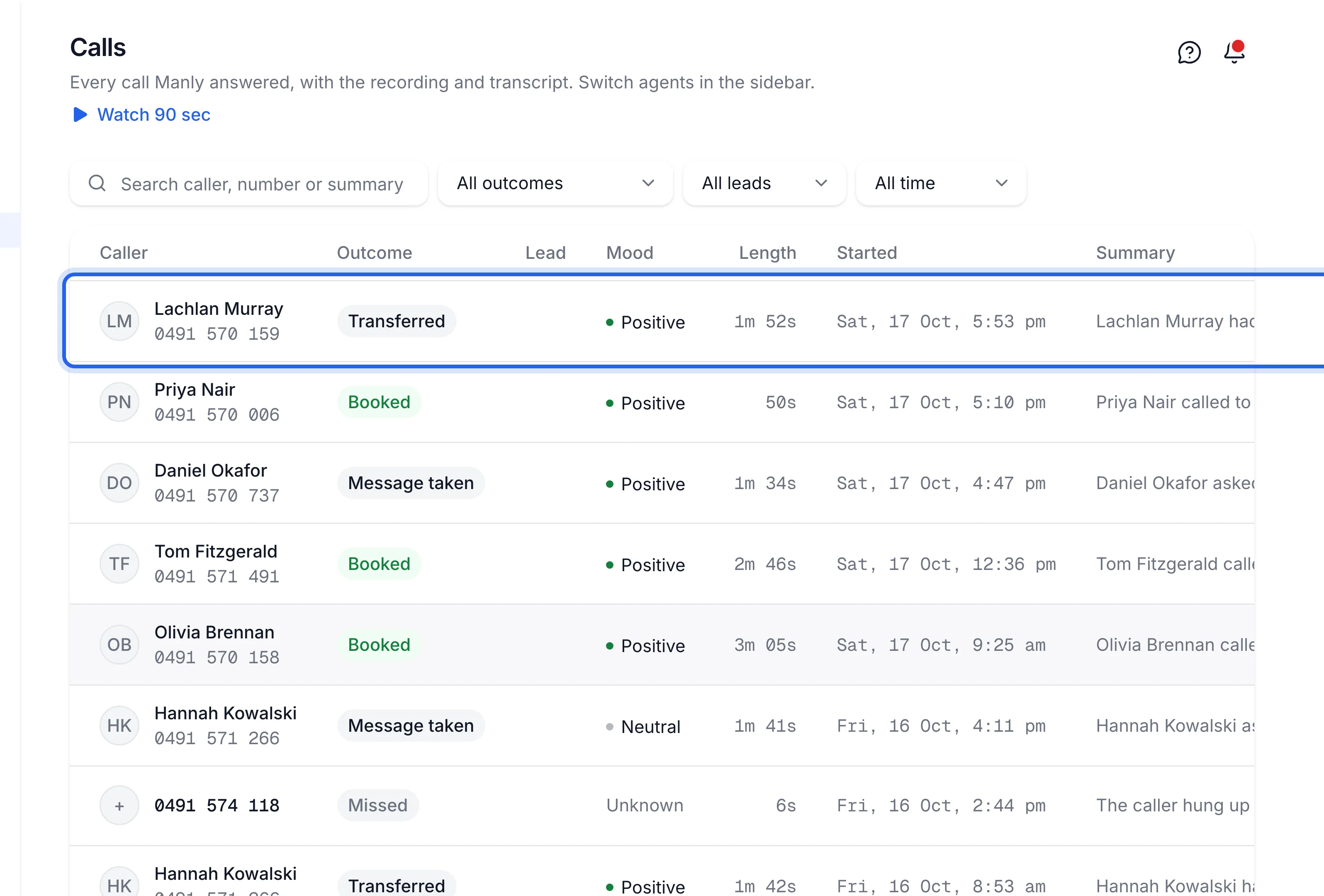
Your test call is answered by your agent and shows at the top of the Calls page, with a recording and a transcript.
Turn it off
Dial the turn-off code from the same phone and press call.
| Carrier | Turn off |
|---|---|
| Telstra mobile | ##21# for every call. For the others: ##61#, ##67#, ##62# |
| Optus mobile | ##002# turns all forwarding off |
| Vodafone mobile | ##21#, ##61#, ##67# or ##62#, or ##002# for all of them |
On Telstra, *#21# (or *#61#, *#67#, *#62#) checks what's on.
Your Lightspire number keeps working for anyone who rings it directly. To stop your agent answering altogether, see Pause or resume answering calls.
If something's not right
Calls still go to my voicemail
Your voicemail uses a divert too, and it's winning. Turn that divert off with the turn-off code
(on Optus and Vodafone, ##002# clears every divert), then dial the Lightspire code again.
I get an error, or nothing happens
Check there are no spaces and the code ends with #. Vodafone prepaid can only forward to
voicemail, so diverting needs a Vodafone plan. On a business phone system (PBX or VoIP), set
forwarding in the system itself or ask your phone provider.
Callers hear "can't take calls right now"
The divert works, but your agent isn't answering. It's paused, out of talking time, or the plan isn't active. Open the Agent page and read the card at the top. See Calls stopped being answered.
Will forwarded calls cost me?
Telstra says forwarding is included in plans with unlimited calls. Vodafone says forwarding within Australia is free on a plan. Optus asks you to check your plan. On other plans, ask your carrier.